









Internal Medicine EHR Buyers' Guide
Internal medicine practices manage complex patients with chronic conditions, preventive care needs, and diverse treatment plans.
A specialized EHR system can streamline these workflows. Modern internal-medicine EHRs digitize patient charts, test results, medications, and billing in one place. In fact, nearly 90% of U.S. office-based doctors use EHRs.
Selecting an EHR built for internal medicine, clinics can improve care quality, boost efficiency, and support compliance with quality programs like MACRA/MIPS.
Why a specialized EHR matters for internal medicine
- Improved quality of care: EHR systems give doctors quick access to patient histories, medication lists, and lab results so they can make better-informed decisions. In emergent situations, this instant access to critical data (allergies, med lists) can prevent medical errors.
- Efficiency gains: Digital scheduling and automated billing speed up admin tasks; EHRs can prevent double-bookings, automatically generate bills, and send patient reminders. By reducing paperwork and manual coding, practices free clinicians’ time for patients.
- Greater patient engagement: Integrated patient portals let people view records, request appointments, and message their care team online. This transparency empowers patients, especially those with chronic conditions (over 75% of American adults), to stay involved in long-term care.
- Supports chronic disease management: Internal medicine providers need tools for diabetes, heart disease, asthma, and more. Look for EHRs with built-in registries and care protocols (e.g., disease-specific templates, health maintenance reminders) to track preventive measures and follow-ups.
- Enables quality reporting: Compliance with MACRA/MIPS and other initiatives is critical. A good EHR is ONC-certified and includes dashboards or reports for quality metrics, ACO/PCMH programs, and billing codes. This lets practices submit required data efficiently and maximize incentive payments.
Features to look out for
- Specialty-specific templates and workflows: Ensure the EHR offers internal medicine–focused forms (SOAP notes, HPI exams, chronic care plans). Many systems include libraries of templates and protocols (e.g., diabetes foot exams, hypertension follow-ups) that you can customize.
- Clinical decision support: Look for real-time alerts (drug interactions, preventive care reminders, best-practice guidelines) built into the charting workflow. Evidence-based prompts can improve care (for example, flagging overdue vaccines or needed lab tests). Integrated knowledge bases and decision rules are valuable for complex cases.
- e-Prescribing (EPCS): The system should support electronic prescribing for all medications, including controlled substances. Automatic checks for drug-drug interactions and allergies are essential for patient safety. Verify it connects to national prescribing networks (e.g., Surescripts-certified) for fast pharmacy transmission.
- Lab and imaging integration: Your EHR should connect to labs and imaging centers. Ideally, it will let you order tests and view results directly within the patient’s chart. This avoids duplicate paperwork and keeps all data in one place.
- Patient portal and engagement tools: A modern EHR includes a patient portal for online scheduling, digital check-in, messaging, and sharing education materials. Online appointment reminders and eligibility checks cut no-shows, while HIPAA-compliant chat keeps patients and staff coordinated.
- Telehealth and virtual visits: Built-in video visits let you consult patients remotely without separate apps. This capability extends care (especially for chronic patients who can’t always travel). Check that the EHR supports easy scheduling of video appointments and integrates them into the medical record and billing.
- Reporting and analytics: The EHR should automatically track quality measures (MIPS, HEDIS, etc.) and offer reports on practice performance. Look for dashboards that show metrics like screening rates, immunizations, or ACO/PCMH criteria. This makes value-based care reporting painless and helps your practice stay competitive.
- Mobile and cloud access: Cloud-based EHRs with iOS/Android apps let you work from anywhere. For example, physicians can review charts or approve refills on an iPad between sites. Mobile access has become essential; many doctors expect to be able to view records on the go. A true cloud platform usually also means the vendor handles updates, with users able to log in from any internet device.
- Billing and practice management integration: Internal medicine groups benefit from an EHR that ties directly into practice management. Look for features like automated superbill creation, claims scrubbing, and one-click billing. Seamless integration between clinical notes and billing reduces coding errors and speeds up reimbursement.
- Customization and workflow flexibility: Your EHR should adapt to your workflow, not the other way around. Seek systems that let you customize screens, order sets, and shortcuts. This flexibility helps doctors chart more naturally and maintain productivity.
- Security, support, and training: Verify the software meets all privacy standards (encryption, audit logs, HIPAA compliance). Check what training and support the vendor provides; 24/7 help desks, online tutorials, and responsive service will prove invaluable. The right vendor will assist with data migration and offer ongoing upgrades so your system stays current.
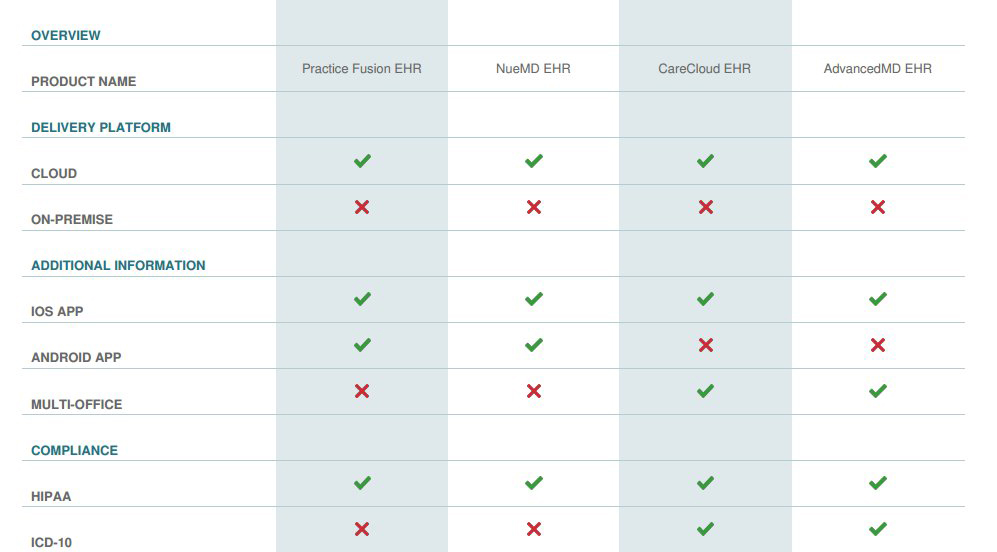
Tip: Use the filters in the above comparison matrix to narrow down your shortlist.
5 internal medicine EHRs to add to your shortlist
- CureMD (Best for small-to-mid practices that want specialty-tailored workflows.): An all-in-one, cloud-based EHR with built-in internal medicine templates (health maintenance, chronic care protocols), EPCS/e-prescribing, advanced reporting, and revenue cycle management. Pricing and exact implementation timelines vary by package; confirm whether the quoted package includes RCM or requires add-ons.
- RXNT (Best for budget-conscious practices needing an integrated, easy-to-deploy suite): Another all-in-one cloud platform (EHR, e-prescribing, practice management) with dozens of customizable internal-medicine templates, EPCS/Surescripts certification, predictable pricing, and U.S.-based support. RXNT boasts rapid implementation.
- AdvancedMD (best for growing practices needing a full cloud suite with strong RCM options): AdvancedEHR combines EHR, practice management, telehealth, patient portal, and revenue cycle management; the specialty templates, analytics, multi-location support, and APIs for integrations are useful for practices that expect to scale or want tighter RCM alignment. With many modules and professional services on offer, clarify which features are included in your quoted package and how implementation timelines and costs change for larger, multi-site deployments.
- NextGen Healthcare (Best for mid-size to multi-provider groups that need enterprise capabilities): NextGen Healthcare EHR includes strong interoperability and population-health/analytics tools, options for both small-office and enterprise deployments, and broad regulatory reporting support (MIPS, value-based care). Enterprise-grade functionality can mean a larger implementation effort and modular pricing. Confirm which modules you’ll need for population health or advanced analytics.
- DrChrono (Best for teams that prioritize mobile charting and an app-driven workflow): A mobile-first EHR (iPad/iPhone apps), customizable medical forms, integrated telehealth and RCM, and straightforward e-prescribing/EPCS from mobile devices. If your practice requires heavily customized enterprise reporting or large-scale deployments, validate scalability options and reporting depth during the demo.
Simplifying your selection
To finalize your choice, demo the shortlisted systems and involve your entire care team. Ask providers to test the charting workflow and templates for common conditions.
Have office staff evaluate the scheduling and billing modules. Check online reviews and request customer references (hearing from other internal medicine practices can reveal real-world pros and cons).
Use our software comparison tool (on this page) to weigh each solution’s features and pricing. By systematically comparing top EHRs tailored for internal medicine, you’ll select the one that best fits your practice’s needs. Download your custom comparison today to get started on improving your care coordination, compliance, and efficiency.